
Satellite QSO

[The last renewal of this page: January 28, 1993]

1. Amateur Communication Satellite

There are many amateur communication satellite avalable, but they are roughly classified with two categories as follows.

(1) Elliptical orbit close to the true circle/Ultra elliptical orbit

[Ultra elliptical orbit]
Satellites orbiting on a ultra elliptical orbit. As it goes far away from the earth at its apogee, it is visible from a half-side of the earth and then stations within that side are able to establish DX-QSO each other. It takes a relatively long time to make one orbit, and keep a window open for a long time. As the elevation and the azimuth angles from the earth vary slowly, tracking the antenna is very easy.

[Elliptical orbit close to the true circle]
Ssatellites orbiting just above the surface of the earth. As the visibile area of the earth from the satellite remains limited, the window for establishing QSOs is also limited. As it takes relatively short time to make one orbit, tracking the antenna is very busy. Although it covers limited area, it makes many orbits in a certain time, and as a result, it goes above all over the earth.


(2) Alalogue/Digital

[Analogue]
You can talk using SSB or FM. Both type of satellite in above category are used for this purpose, but what makes the thing exciting is a stable DX-QSO being realized the one in ultra elliptical orbit.

[Digital]
Packet radio is available. It realizes exchanging e-mails and downloading the pictures of the earth being captured by the satellite. Satellites in "elliptical orbit close to the true circle" are mainly used for this purpose. People dosen't communicates at realtime each other like in analogue mode, but writes and reads messages just same as a Radio Bulletin Board System on the ground. (Flying RBBS)

In either case, each satellite has its own up-link frequencies and down- link frequencies, as well as emission types. Most of the satellites have multiple sets of frequencies, so-called a "Mode".


2. Fun of the Satellite Commucnication

Communications via satellite realizes a lot of advantages.

* You don't need big radio station as on HF to make DX-QSOs. -- You don't have to worry about interferes in neighbors. You don't need a big land nor a big tower.

* There is no big difference between a base station and a mobile(portable) station like in HF. -- You can enjoy DX-QSOs at campsight with your portable radio system at the same level as the other stations.

* You can enjoy a stable QSO not being fluctuated due to the activity of ionosphere like in HF. -- You can enjoy DX-QSO according to your schedule keeping good order of your daily life.

* You can calculate the orbit of the satellite you want to know the time for getting a suitable window for the area with which you want to have a contact. You can make the contact for sure at that time. -- The best way to keep a schduled QSO with a DX station.

* Using digital satellite, you can exchange e-mail with all over the world and also you can download picture files of the earth from the satellite. -- Internet on the amateur radio(!?)


3. Available Amateur Satellites

We only have AO-10 as a satellite for good DX-QSO which is about to pass away, after the super AO-13 excellent for DX-QSO felt on the ground in 1996. Other than AO-10, we only have a few satellites just flying above the surface of the earth which provide us a DX-QSO in neighbour countries in short time. We are anxious to have the new Satellite(Phase-3) will be launched shortly.

(Unit:MHz)
Name of the SatelliteMODEUP-Link FrequenciesDOWN-Link FrequenciesBeacon
-OSCAR-10-435.030--435.180145.975--145.825145.810
UOSATOSCAR-11--145.825, 435.025, 2401.500-
AMSATOSCAR-16-145.900, 145.920, 145.940, 145.960(FSK1200bps)437.026, 437.051, 2401.143(PSK1200bps)-
DOVEOSCAR-17--145.825(AFSK1200bps/Digital Voice), 2401.221(PSK1200bps)-
WEBEROSCAR-18-1265.000(AMTV/NTSC)437.075, 437.102(PSK1200bps)-
LUSATOSCAR-19-145.840, 145.860, 145.880, 145.900(AFSK1200bps)437.153, 437.126(PSK1200bps)137.125
FUJIOSCAR-20JA145.900--146.000435.900--435.800435.795
JD145.850, 145.870, 145.890, 145.910(AFSK1200bps)435.910(PSK1200bps)-
UOSATOSCAR-22-145.900(FSK9600bps)435.120(FSK9600bps)-
KITSATOSCAR-23-145.850, 145.900(FSK9600bps)435.175(FSK9600bps)-
KITSATOSCAR-25-145.870, 145.980(FSK9600bps)435.175, 436.50(FSK9600bps)-
ItmasatOSCAR-26-145.875, 145.900, 145.925, 145.950435.867, 435.822(PSK1200bps /FSK9600bps)-
AmradOSCAR-27-145.870435.800(300-9600bps)-
RadioSPUTNIK-10A145.860--145.900--
K/T21.160--21.200--
A/K-29.360--29.40029.357 29.403
T-145.860--145.900145.857 145.903
ROBOT21.120, 145.82029.403, 145.903-
RadioSPUTNIK-11A145.910--145.950--
K/T21.210--21.250--
A/K-29.410--29.45029.407 29.453
T-145.910--145.950145.907 145.953
ROBOT21.130, 145.83029.453, 145.963-
RadioSPUTNIK-12A145.910--145.950--
K/T21.210--21.250--
A/K-29.410--29.450-
T-145.910--145.950145.912 145.959
ROBOT21.129, 145.83129.454, 145.958-
RadioSPUTNIK-13A145.960--146.000--
K/T21.260--21.300--
A/K-29.460--29.50029.458 29.504
T-145.960--146.000145.862 145.908
ROBOT21.138, 145.94029.504, 145.908-
RadioSPUTNIK-15A145.857--145.89729.357--29.397 29.398 29.353


4. Kepllerian data of Satellites at the AMSAT Web site (the latest)

Download the Kepllerian data of Amature Satellites (NASA 2 line format)

Download the Kepllerian data of Amature Satellites (AMSAT format)

5. Radio system for the Satellite Communication (Example of JR1MAF)

As you may suspect from the list above, the radio systems will be differed depending on your purpose i.e. which satellite you wish to use, and depending on which mode you wish to use. In my case, I am defining the satellite communication as "a reliable DX communication method from base and portable station" for me. Then, my principal satellite is one like AO-10 which has a ultra elliptical orbit. However, we will need different systems for the expecting new satellite(Phase-3) even it will have the same analogue mode.

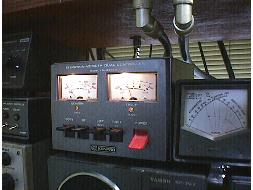
TRANCEIVER : YAESU FT-736 (50/144/430/1200MHz All mode tranceiver)
You need a taranceiver which allows you to use different band for tansmission and reception. And it is essential to be able to monitor the receiving frequency during your trans- mission in another band. A satellite mode like in FT-736 which allows you to vary transmitting frequency as you vary the receiving frequency in both ways, up and down, is highly recommended to make it easy to operate. As people receives your signal with a lot of noise in back groud, excellent speech processor with basy audio will be helpful.

LINEAR AMPLIFIRE : 50W at maximam.
You have to pay attention a lot to run a minimum power you need. Too much power results not onlly eating up electric power resource of the satellite, but also driving Automatic Gain Control system of the receiver of the satellite. As a result, the receivers gain will be controled to be down, and many other users will be troubled. Suitable up-link power varies not only the gain of the antenna you may have, but also varies every moment as the satellite goes in an orbit due to the distance and its attitude aginst the eath. You should always monitor your down-link signal, comparing with other down-link signals, to control your output power, so that your down-link signal strength will be the same level as others. In any case, a linear amplifire will be needed in your system. (With the Phase-3, no one will need it.)

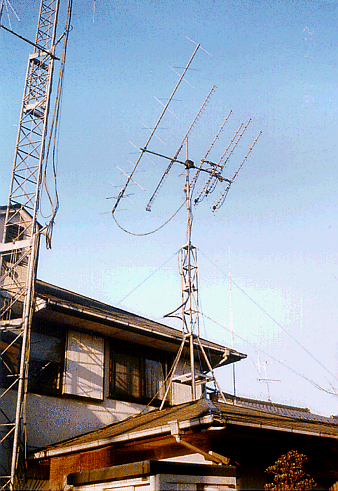
ANTENNA : 144MHz/12element Cross Yagi + 430MHz/16element Yagi 2 X 2
Many stations are using a Cross Yagi for the down-link antenna, as the radiate plain of the satellite varies especially when the satellite stays in a certain attitude to effect it as the satellite spins . There are some who dare use normal Yagi setting it at horizontal plain to avoid the QRM from the illegal mobile stations at the downlink band. (144MHz in Japan) For the up-link, normal Yagi works fine in most of the case except when the satellite spins effect a lot in QSB, as with the normal Yagi, you can easily get more gain than complicated and expensive Cross Yagi.

ANTENNA ROTOR : Kenpro KR5400B
You need two of them, one for azimuth control, and the other one for elevation control. It's very hard to track by manul to the satellite which goes low altitude orbit (Elliptical orbit close to the true circle). You would better to control it by Personal Computer. (Refer to the next chapter)

PREAMPLIFIRE : RX Preamplifire for mounting right below the anttena system.
This is essential. You need one with excellent NF (Noise Figure) ratio. This is not too much to say that this performance defines the station's quality. Different from the DX QSO in HF, most of the stations are in the same condition. So, if you loose the weak call back signal to your CQ call, and repeat another CQ call, it is obvious that you are shouting "I have no ears to listen!"

MICROPHONE : Heil Dynamic Microphone, Astatic Eagle Microphone
Microphone is also important. As I stated above, you can't run more power to come on top of other stations, so the audio quality is something to do. You should monitor your down-link signal to judge which microphon will cut through QRM better. I found it out that a Hi-Fi high quality microphone normaly doesn't matches to this purpose.

With above equipment, you can enjoy FB QSO via AO-10. (With AO-13, which passed away in 1996, we used to enjoy stable super quality QSOs.)


6. Satellite Tracking by Computer (InstantTrack)

(1) InstantTrack


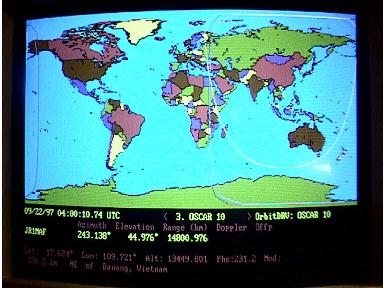
Main graphic screen of InstantTrack (Tracking AO-10)

There some softwares so-called Satellite Tracking Software which computes the orbit and azimuth angle and elevation angle from the given point on the earth at real time. The InstantTrack by *N6NKF (Franklin Antonio) is one of the best one among them , and I have been using it for many years.

* Franklin Antonio, N6NKF
2765 Cordoba Cove, Del Mar, CA 92014 U.S.A.
(SASE needed) CompuServe ID : 76337,1365

A. Required Hardware

-IBMPC, or AT, PS2, clone, etc.
-At least 512KB memory.
-Maps presently require EGA or VGA display.
-A numeric coprocessor(8087 or 80287) is NOT required, but is recommended.

B. Characteristic

-Computes faster than other softwares.
-InstantTrack displays full color high resolution maps of the Earth.
-InstantTrack reads the popular NASA and AMSAT format satellite element files and updates its database automatically.
-InstantTrack automatically sets time on your computer by accessing the NBS time service via your modem.
-InstantTrack can accept 200 registrations of the different satellite data, and are switchable easily with a cursol key.
-InstantTrack understands shows you when satellite can see other satellite, and tells you capability of QSO by crosslinks.
-InstantTrack computes teh angle by which the satellite's antennas are pointed away from you. (Squint Angle)
-InstantTrack supports realtime antenna rotor control via the Kansas-City
-Tracker interface.


(2) Control antenna rotor with InstantTrack

As I stated at the last section above, you can control your antenna rotor tracking a desired satellite automatically. Nobody would understand how fun it is to do this without experiencing it. Once you know it, you would never get back to the manual control again. Especially when you try to track the satellite which goes low altitude orbit (Elliptical orbit close to the true circle), this advantage value as a diamond for you.

A. Required system

INTERFACE BOARD
You need to purchacse the "Kansas-City-Tracker" interface board manufactured by * L.L.Grace. As the text files named INTSPEC.TXT comes with other files in InstantTrack explains detailed description nesessary for designing interface board, you may build your own interface board if you are an exellent engineer. I would say maybe 99.9% of hams should purchase this board.

* L.L.Grace Communications Products
41 Acadia Drive, Voorhees, NJ 08043 U.S.A.
Telephone:609-751-1018

ANTENNA ROTOR
Any rotor will be fine, but except Kenpro/Yaesu KR5400/5600 A/B, or Emotator 700/800, you may need some special work on it. With above rotors, you can even use the cable with connectors comes with the board without any rewiring nor soldering for between the interface board and rotators. (Only the Emotator needs very simple work on a connector) You can use other rotors only by adding relays in their controlers. There is a description how to do it in its manual. This work will no be any problems for most of hams.


Kenpro 5400B

B. Operation

Install drivers and utility files from the FD comes from the interface board first. After adding some statements into AUTOEXEC.BAT file, you have to do some adjustment and test work according to the manual, the system is ready to go.
From the graphic main page of the InstantTrack, all you have to do is to push the "R" key to get the system started. Once you started, the indicators of the rotors start to move, and when they reach to the computed positions by InstantTrack, they will stop. After that, as the satellite goes and changes position, the rotors move a little tracking the satellite forever. If you push the "R" key again, the sytems stops to track the satellite. I am running InstantTrack on an old PC using 386/20MHz which I bought at the junk shop, for 24 hours, controling the Kenpro KR5400/B. (I normally keep it track the AO-10 all the time) I get surprise from time to time, when I get back home, I happen to see the satellite antenna system above the roof of the house turns making noise "Zu Zuttz!". (This is not recommendable as it would be only a waste of the electric power! Hi Hi..)


144MHz12ele Cross-Yagi
430MHz16ele Yagi 2 X 2
1200MHz48ele Loop-Yagi


In case you hit this page directly from a Search Engine, you can reach to all of the pages of MAFNET from Top Page