The Remote Control Project of Home shack
== STEP 9 ==

[The last renewal of this page: July 12, 2009]
STEP 9. Video Monitor
Well, so far, we got everything that we need for the remote control of the radio station. For the last step, we may think of monitoring function of the shack. We are normally far away from the shack when we use this system, and what we control are electric equipments. It will be comfortable if we could confirm the status of these equipments in the shack visually for the safety purpose. So the final thing we have to consider is a monitoring system using a video camera.
A video transfer seems to be a tough work, but wait a minute, we already have it in our system already. That's SKYPE. With the SKYPE , we can realize a TV phone using a web camera being connected to the PC, together with chatting by characters. This is the way to go! I tried it using an old we camera, setting the SKYPE software on the PC being connected to the radio to accept always the video communication. A monitor window is shown up on the mobile PC after the connecting SKYPE.
I recognized at once that we needed lighting to get a clear view. I was trying to monitor FT-817 and a cross needles SWR meter, but it is dark when I am not at home, of course. Especiall, at night, it is completely dark, and nothing could be visible through the camera! I was wondering if I needed something like LED illumination for this, but I happened to meet with a super excellent web camera in Akihabara.
That is the "Cam 130 Night Vision2"(GR-CAM130N2) from Timely Corp. with the brand of "GROOVY". The 1.3 million pixel sensor is used. (It is run at 300 thousand resolution) The maximum size of movie image is 1280 X 960pixels (15 frames/sec.), and with 640 X 480 pixels mode, video goes very smooth at 30 frames/sec.
It has a sensor and adjusts an iris automatically following to the wide range of the brightness(darkness). The contrast and white balance will be also automatically adjusted. When it gets dark completely, it will be switched to the night mode. The infrared rays will be radiated, and the objects are still visible very clearly under black and white mode.
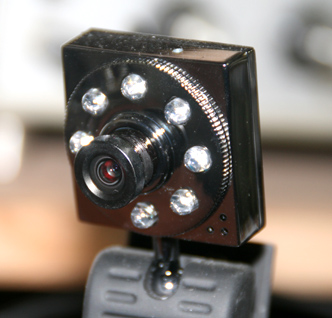
The lense of this camera are very diffrent from other web cameras, using four glass lenses with the optical coating on the surface. The focus ring has a sure structure, and is able to adjust in a wide range. Eight LEDs surrounding the lense are the infrared ray LEDs, and they'll be turned on when it's necessary (get real dark), although it is invisible, and provides a very clear video images continuously.
I was really surprised with the quality of this camera. I bought this in an outlet-shop in Akihabara with only JPY1,500(US$15.00), but....I have never seen a camera with such a excellent structure and quality as this one. Not only its price, but also its quality...I just can't believe it.
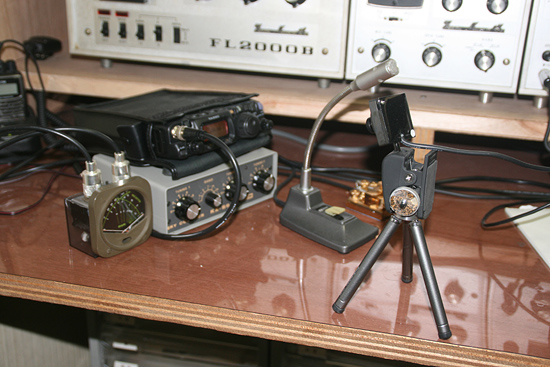
Fixing a CCD camera mouting on a portable mini-tripod looking ahead to the radio.
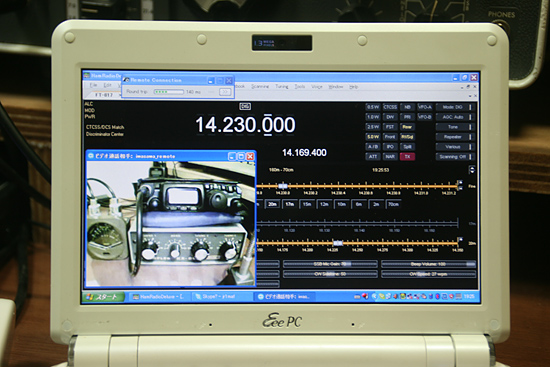
This picture shows the mobile PC operating remote QSO. As I have set the SKYPE on the PC being connected to the radio to accept video communication always, I am always able to monitor my radio when I get connection to the SKYPE on the PC in the shack.
The LED pannel of FT-817 is so small and has low contrast and low brightness and is easy to get reflection, that it is not very easy to check what it says, however, for me, more important merit is to be able to monitor the SWR meter. It tells in real time the RF output is really going out properly, and it's more than anything to know.
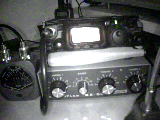
The picture on the left is one being monitored in daytime with the normal lighting. (With the lighting OFF, almost the same.) The picture on the right is one being monitored at night without any lighting (complete dark)! It's a balck and white mode, but you still can see everything very clear as in the daytime.
I was so happy to get this camera, with a high sensitivity and clear image in the darkness radiating infrared ray. I strongly recommend this camera for your system.
 In case you hit this page directly from a Search Engine, you can reach to all of the pages of MAFNET from Top Page