The Remote Control Project of Home shack
== STEP 8 ==

[The last renewal of this page: July 12, 2009]
STEP 8. Operate on CW
Almost all the functions that I imagined in the beginning have been realized so far. However, one more important thing is left. The CW operation.
CW is an indispensable mode, may be more than the digital modes such as SSTV, etc. Especially for DXing on 50MHz, it may be mandatory.
It seems that many hams are enjyoing CW using softwares being linked with logging softwares. Rather few people are enjoying a ragchew on CW, and most of people seems to be enjoying with number of QSOs through a rubber stamp QSO. If so, the messages being used in a QSO would be limited, and would be selected by clicking macro buttons which the relative messages are pre-registered to make the operation very easy. In this sence, operating CW from a PC would be an ideal method.
Even for the people who wants to enjoy a ragchew on CW, keyboard operation to send mesagge is really helpful, because they don't have to care about the real codes being transmitted, just concentrate in touching a keyboard as fast as they wish, and accurate CW codes will be followed automatically.
I case of using a keyboard for sending CW codes, normally you would not use abbreviated words as many as in a normal CW keying. It may cause additional load for the station work with. For this problem, many CW softwares have the RX window where the codes being received will be decoded in alphabets, which will be really helpful.
Well, a real CW fan may use CW key, and enjoy ragchew with his own ears, however, I thought these softwares would be nice for the limited conditions such as a remote controlled operation.
There are many CW softwares, and for the CW codes control, there are two types; one which controls keying jack of radio directly, and one which use the tone signal being created with a soundcard of PC to be send of SSB mode. I firstly intended to use the later one because the intereface was not needed, however, I could not find a suitable software and also I found it possible to get unclear tone especially under usage of SKYPE, and therefore, I gave it up. So I decided to build an interface for the direct keying.

This is a circuit diagram. It's so simple! There was nothing to hesitate, hi hi.
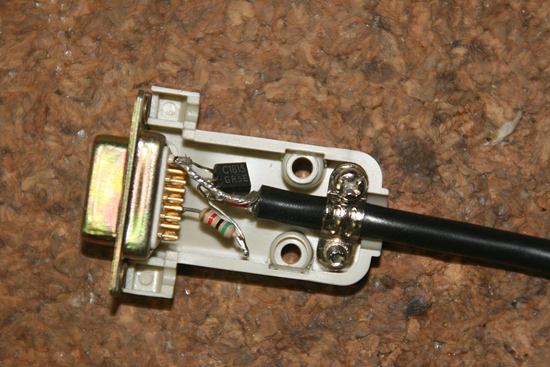
All what you need is a transistor(2SC1815) and a resister (5K ohms). I put them all in a D-Sub9pin plug. It took me only half an hour.
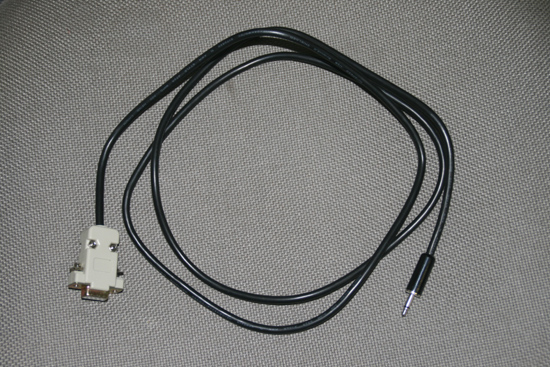
This is a interface cable being completed.
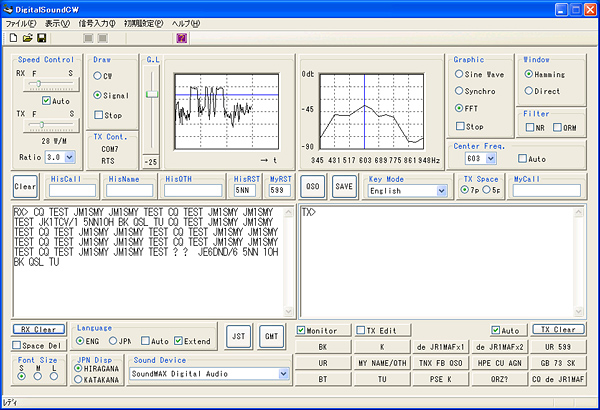
I tried many softwares, and finally decided to use "Digital Sound CW" (freeware) being designed by JA3CLM. Here is his Download Site.
With adjusting the threshold level and the centering the frequency, it can decode CW codes very well. RX filters are very useful if your radio does not have CW filters. The center of the audio frequency spectrumgraph on the right will be set to the basic CW tone frequency of your radio (I set at 600Hz for my FT-817), and what you need to do is to adjust radio frequency so that the peak of the graph comes in its center. This makes your TX frequency right on the same frequency of the station being in QSO. It also has many macro buttons for the typical messages. This is a very excellent software for practical use.
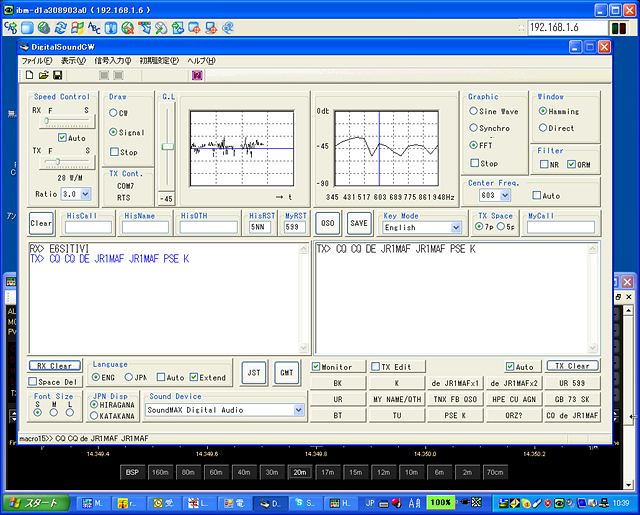
This is a window which is a part of the screen on the mobile PC (Actually, I captured this from a desktop PC on the LAN in my home, because I wanted show you all the window). This window is for Ultra VNC (See STEP.5) to get the screen of the PC being connected to the radio in my shack. Digital Sound CW is run. The task bar at the bottom including START button is that of a PC being connected to the radio.
This shows the screen right after having sent a CQ. Reaction and touch feelings are rather dull, due to the VNC, but are acceptable. SKYPE for manitoring audio signals and Ham Radio Deluxe to control the radio are also running of course.
Thus, I anyhow get able to operate CW. In the beginning, I worried about an operation without manipulater, I finally found it very comfortable with blind toutch keyboard "keying". It is something like RTTY's feeling.
 In case you hit this page directly from a Search Engine, you can reach to all of the pages of MAFNET from Top Page