The Remote Control Project of Home shack
== STEP 7 ==

[The last renewal of this page: July 11, 2009]
STEP 7. Remote Control of the Power Swithes
Well, everything I desired has been realized so far, and then now I have more desires. There are many equipments that I want to switch them ON and OFF. AC power lines of equipments in the shack and Linear amplifire are easily hit on. (As my radio is FT-817, 5W QRP, so there's no idea to use linear amplifire, but that might be fine if I could correspond twith it technically.)
Now, USB-IO supplied by Km2Net that I already assembled in STEP-6 is ready to use. It controllable current is 15mA MAX, so what I need next may be SSR(Solid state relay) to be controlled with this board. I purchased a kit for SSR as well.(It costed me only JPY250.00/US$2.50)
The problem is a control software. There are some for experimental use which are designed by pioneers on the Internet, but they are not very practical. It seems that I'd better study about Visual Basic and design a suitable software by myself??
Checking websites, I learned the Visual Basic is a free software. So I download it right away.(It contains many files in a big size, so it took nearly one hour to have it installed completely.) In the next day, I bought a textbook for the Visual Basic programming in Akihabara, and I managed to complete a very simple software ( I'm not sure wether if people calls it a software or not.), and here it is. (If you would like to try it, please download it from here. Run the executable file together with an accompanied dll-file in the same folder.)
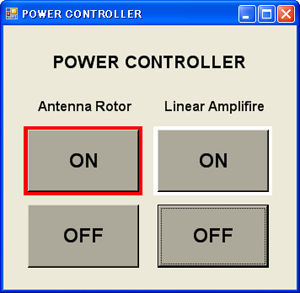
To tell the truth, I needed to work hard till I got to this simple stuff. I did not know the structure and function of USB-IO, so my first step was to try everything running the circuit with wiring LED circuit to check. To design the software, I did a cut and try checking and debugging software to confirm its function to learn the way to design.
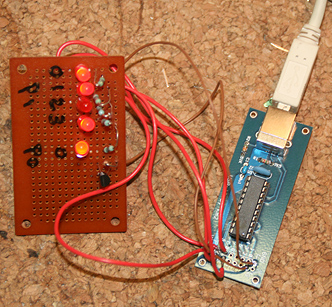
After all, what I learned was that a USB-IO was able to control swithcing ON-OFF only for two channels without interferences. (It is obvious because it has only two ports, however, I even did not understand it in the beggining.) I wanted to control four channels in my first plan, but I changed it to two channels for now, and will add another USB-IO if I really need four channels in future. (It is only JPY1,500/US$15.00, so...)
I knew that the port0 accepts 15mA of max. current, but the port1 accepts only 5mA, and is not much enought to turn on a LED, so I added a transitor (2SC1815) to run a LED. I confirmed that two LEDs being connected to two ports were well controlled with my simple software, so solidstate relays will be well controlled as well.

This is a circuit diagram.
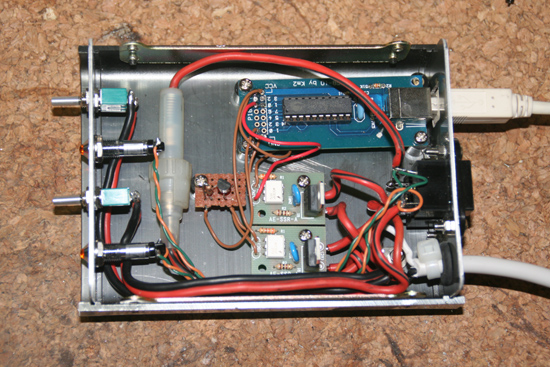
I put it in a case. Two little boards are kits of solidstate relay that I bought at Akizuki Electronics Corp. (JPY250.00/US$2.50 for each) With a heatsink it will accept 20A(AC100V) max. current, but without it, it will stay at 2A. I am intending to use this for an antenna rotor and a small linear amplifire, so this is much enough. If I will need to control a big current, what I should do is to control a big relay with this. (It's an embarrassing to show you my poor wiring, hi hi)
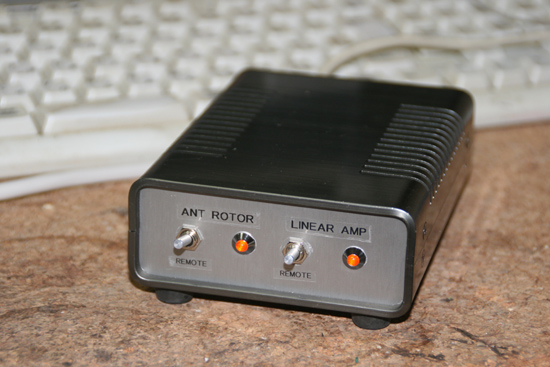
Two neon bulbs indicate a status of AC power supply. Two switches are for manual turning on, and should be switched to the REMOTE normally.
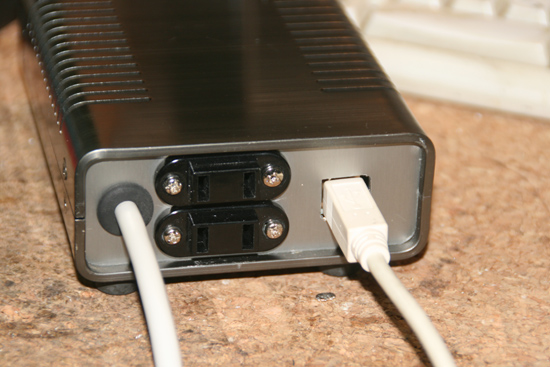
AC100V power line plugs for an antenna rotor and a linear amplifire(DC power supply, maybe, in my case.) should be connected to the sockets at the back of the case.
Congratulations! Now, the remote control of the AC power line through the PC is ready to go. A high power station may need to control a ventilator or an air conditione. My radio, FT-817ND accepts a power on/off control via Ham Radio Deluxe, so I do not use this system for it. (Some radio may need this system to control its power on/off.)
It may be possible to control AC power switching for the PC being connected to the radio, using the power control function in the BIOS, however, I dare to leave it power on for all 24 hours due to following reasons (Back light should be off during being away from the shack by closing the laptop....You need to change setting so that the cpu would not to be powered off even you close the laptop.):
1. If the power is off, the interval access by OUTLOOK to the DNS service organization for getting a pseudo IP address will be stopped, and therefore the mobile PC will not be able to access to the PC in the shack from the start.
2. Consumption of electricity is limited with a laptop PC.
3. That's not a very comfortable to wait for a couple of minutes till the PC in the shack is boot up and ready to be operated.
4. While I'm out of the shack, I am always monitoring SSTV and auto saving images on 14.230MHz.
 In case you hit this page directly from a Search Engine, you can reach to all of the pages of MAFNET from Top Page