The Remote Control Project of Home shack
== STEP 2 ==

[The last renewal of this page: June 13, 2009]
STEP 2. Connect the audio line to PC
Radio is now controlled by PC in STEP1, but without important audio lines, remote QSO will not be realized.
To realize this, I took the way to get a connection to the DATA socket at the back of FT-817, not the way to use a MIC socket and SP jack. That is more convenient to work SSTV oar RTTY, and a connection with only a single cable with mini-DIN-6p plug seems very smart. Removing a single cable is a very quick task when I have to bring the radio out of the home shack for a portable operation as well. It also leaves MIC and Speakers as normal, so that it is good for the case that I try to use it at my home shack directly without any switching. So, I bought an optional packet cable (CT-39A) without any hesitation.
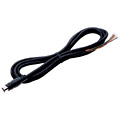
You can buy it with only JPY1,890 (US$19.00), but you need a solder work because one end of the cable has not plugs connected.
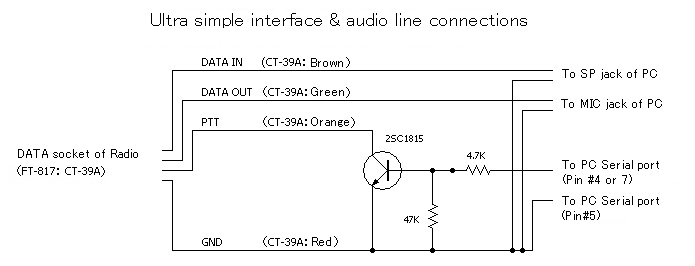
Four lines such as Audio input, audio output, PTT, and GND are all what we need. A little sheet comes with a cable shows the connections for each color of inner lines. You need to attach two mini-plugs for MIC jack nad SP jack of the PC.
You have to do a little work for PTT line. The line is supposed to connect to the DTR or RTS line of the serial port of PC, but you can not do it directly. Using a transitor, you have to build a simple interface, and then connect the line to DTR (pin#4) or RTS (pin#7) of D-Sub-9pin plug for the serial port of the PC.
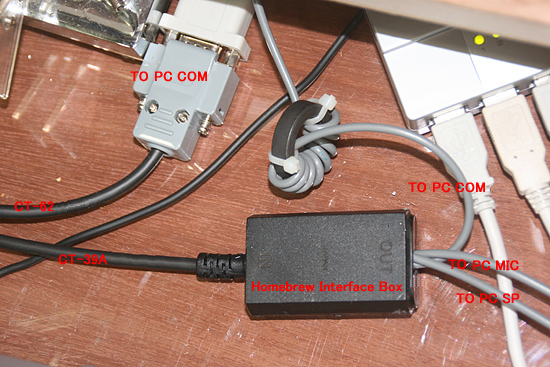
Using a plastic case of an old impeadance transformer for VHF TV, everything was set in.
Regarding this PTT line here, it is possible not to prepare it, because the radio control by Ham Radio Deluxe(STEP1) through DATA cable enable PTT control as well. However when we try to use softwares like MMSSTV or MMTTY for SSTV/RTTY operation, this PTT line is required. There is a certain optional file to enable PTT control through Ham Radio Deluxe using its control line to DATA socket, but then you need to run Ham Radio Deluxe essentially everytime you work SSTV/RTTY even if you do it at your home shack. So, anyway, it is better to wire this PTT line for the case.
Well, in case of FT-817, the audio signals delivered to the DATA socket at the back of radio is connected to the inner circuit only when the digital mode. (MODE: DIG) In another word, for SSB, FM, and AM mode, audio signals from the microphone which is connected to MIC socket of the radio will be lead to the inner circuit, and audio will be output to the speakers which are connected to SP jack of the radio.(or inner SP)
You can work SSTV/RTTY with the DIG mode, but no audio signals would come and go between the radio and the PC.
You have to choose USER-U option for the DIG Mode with menu(#26) for this. With this setting, you can transmit and receive USB (in case of LSB, select USER-L) using audio lines through DATA socket. This might be very unique feature of this radio, so you may have to check this with the manual for your radio.
Of course, you need to adjust the audio level with your soud card controler of the PC. Open the Control Pannel, select Audio Property, and with Playback for PC out put which is transmission level, and with Record for PC input which is receiving level, adjust slider controls.
Now, at this point, the following functions are ready to use.
(1) Using Ham Radio Deluxe, using TX button for PTT, and a head set(one you use for SKYPE or Net Meetings) connected to PC, you can enjoy QSO with SSB (AM/FM).
(2) Using softwares like MMTTY and MMSSTV, you can enjoy SSTV/RTTY QSO with automatic PTT function.
I found a problem when I run the Ham Radio Deluxe, the PTT control by MMTTY and MMSSTV made a collision with the one by Ham Radio Deluxe, and then automatic PTT control by MMSSTV/MMTTY never worked. Those two softwares have no problem at all as long as being used without the Ham Radio Deluxe runs at the same time. This problem was resolved by installing "HRDPTT", an optional software for Ham Radio Deluxe. After you install this file, the PTT control from MMSSTV/MMTTY is relayed to Ham Radio Deluxe by "HRDPTT", and then Ham Radio Deluxe controls PTT perfectly.
 In case you hit this page directly from a Search Engine, you can reach to all of the pages of MAFNET from Top Page