
The Remote Control Project of Home shack

== STEP 1 ==

[The last renewal of this page: June 12, 2009]

In past few years, it is getting popular to see those who build a remote shack far from his home, at the best location for radio, controling every equipments via Internet from his home with PCs. That's great, indeed!

Well, in my case, it is hard to try remote shack, but I was interested in all technology itself being used for the remote control via Internet. Another idea was to prepare for the case in the future that one of my best friends would tell me that he will give me a whole property of a moutain for my radio activities.(hi hi!) Anyway, I wanted to learn the relative tecnology for the remote control, and complete the system actually.

My idea was 180 degrees oposite. Yes, one which is controlled remotely is not a wonderful remote shack, but my old home shack! I planed to control remotely my homeshack from out of my home to enjoy DX-QSOs. One more important condition is to accecss the Internet from the mobile laptop comuputer using a wireless data communication device. They are not ADSL nor optical fiber, of courese, but they are not Wireless LAN either, because all of those method requires me to stay at the certain place while the operation. That's not the idea, just like your Celular Phone, one excellent wireless data communication service realize a continuous connection to the Internet wherever you go or dive while in use. My home shack should be controlled by my small laptop wherever I was, wherever I go, even while I am driving my car on the highway, or enjoying a travel in the long distance railways. It could be my office, it could be a hotel, it could be in outdoor.

Oh yes, if I try to use the wireless LAN or cable LAN in the hotel room, I am always ready to get of the air from my home shack, wherever I am in the WORLD! (Gee with!!)


[Basic equipments being used at my Home shack]

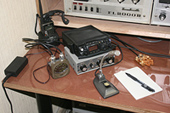
TranceiverYAESU FT-817ND (5W)
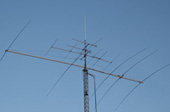
AntennaHomebrew 5 element monoband Yagi for 14MHz (22mh)
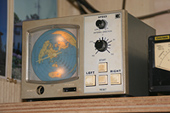
RotorEMOTO 1200FX
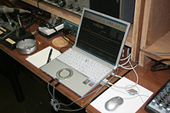
P.C.Panasonic Let's NOTE CF-W4 1.7GHz/RAM1GB WinXP HomeEdition


I purchased FT-817ND for the portable operation, and I usually put it on the desk of shack being ready to be packed to go out with me, but it is true that most of the time it has to be unused, and also I recognized it is only one "modern" radio which cna be controlled by PC in my shack which is full of tube radios in 1960's.! Thus, this FT-817ND was automatically selected to be a menber of this project.


[Equipments in mobile]

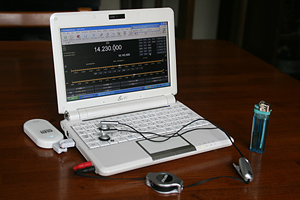
Mobile PCASUS(Taiwan) Eee PC901@1.6GHz/RAM1GB WinXP Home Edition
Wireless Data Communication CardEMOBILE D02HW/7.2Mbps Max. for D/L


I have already experienced that there is no problem at all to access the EchoLink with this mobile PC equipments.(Please refer to the page for "EchoLink" of this HP) So, I had a confidence that it would have no problem at all in its communication speed and its accessibility.


STEP 1. Control the Transceiver from a PC

The very first step is to control radios within the same shack from a PC. It is not difficult at all because modern radios have capability to be controled by PC and already have a socket for the cable, and the relative "PC control cable" are sold as an option. Also, we can download excellent control softwares (Free software) from the Internet.

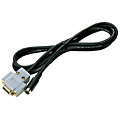
A control cable for YAESU FT-817 is called CT-62, and costs only JPY3,675 (US$36.00). So this was the first thing that I had to buy.


A mini-DIN-6pin plug is connected at one end of the cable, so this should go into the CAT socket at the back of FT-817. A D-Sub-9pin plug is connected to the other end of a cable, and this should go into a serila port of the PC. As my PC was a laptop, and like most of other modern laptop PCs, it does not have a serial port, so I used a serial-USB converter. (You can find it at only JPY900 (US$9.00) with a driver CD at Akizuki Electronics in Akihabara!)

For the control software, download a freeware "Ham Radio Deluxe" It is hard to believe that is a free because of its full of wonderful functions.

You can go to the download site from here

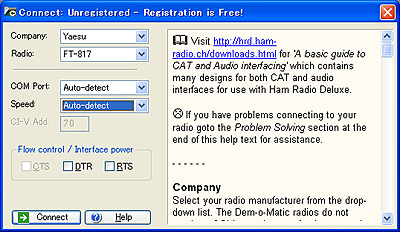
After setting a control cable between the radio and the PC, run Ham Radio Deluxe. A coonect window will be shown up automatically.


Select a radio manufacturer and a radio model from the pulldown menues. I found most of PLL type radios for Yaesu, Kenwood, and ICOM there.
"COM Port" and "Speed" are setting for serial port that the control cable is connected, but the most easy and quick way to do it is to select auto-detect respectively.
"CI-V Address" is activated only for ICOM radios. For controlling ICOM radios, a unique address for each model is needed to be set. (Refer to the radio manual) "CTS", "DTR" and "RTS" are one of the lines of serial control to select for PTT control, but is different by each manufacturer/model. Detailed help message is available in the right window together with CI-V address mentioned above.

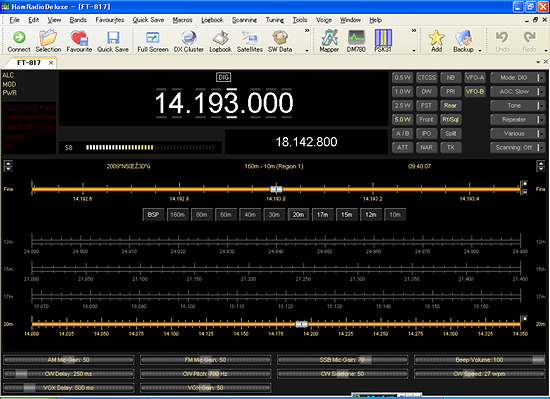
Once connection is established, a window of the control panel like a radio panel is opened.


With this panel we can control most of functions of the radio. Well, I better say that we can do adjustment and setting much easier and more comfortable than doing it touching the radio directly. One of the modern radios common problems is a complicated menue structure which is brought up by pusshing a function key for a few seconds and select menue with turnig the other dial nob, and push some switch to set, etc. It is really hard to remenber what and how I can do at once. However, for example, this panel has slide-gain-controlers of MIC Gain for each mode at the bottom, and all you have to do is select and drag directly with a mouse. Many other commnads are assigned to independent buttons. Especially for super compact radio like FT-817, usability is much improved with this software. You can also customize layout and colors of panel as you like. Nothing was difficult so far.


In case you hit this page directly from a Search Engine, you can reach to all of the pages of MAFNET from Top Page