[The last renewal of this page: May 31, 2014]

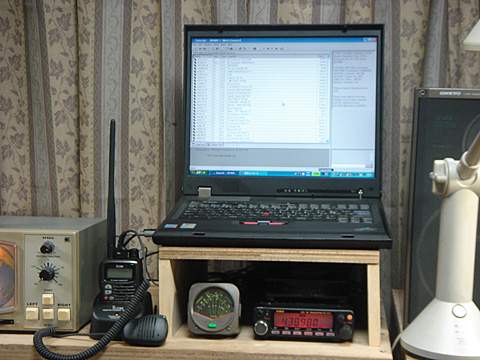
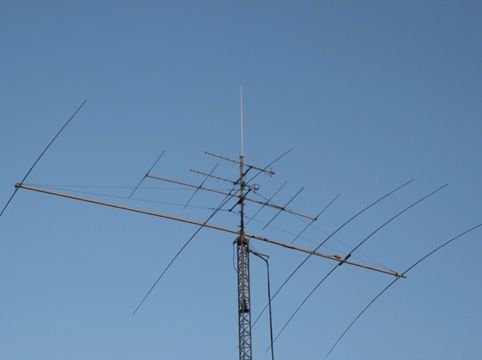
The JR1MAF-L link node. (IBM G-41 + ALINCO DR-420 35W + 25mh 9dBi GP) Frequency: 430.98MHz (Tone: 100Hz)


** EchoLink changed my radio operation style completely! We will never need a big antenna for HF band nor multi-KW linear amplifire to enjoy a stable ragchew with DX stations anymore! You can send a complete final to your neighbors for interference. You do not need a big investment for the radio nor worry about the electric bill.

** Those who think it attractive because of uncertainty being affected by propagations on HF bands could lose their obsession if they try to use the function of random connection to the station being accessed to the server of EchoLink.

** Let award hunters to monopolize the Big antenna + High power! For those who are interested in rangchews with DX station, nothing would be better than EchoLink!

** Regardless of location of the station you'd like to talk to, even if he is in the next town or in the oposit side of the earth, you can communicate with him equally in the super local quaility. It is really outstanding!


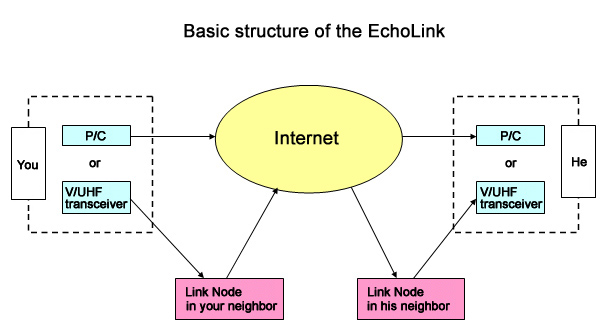
** The above chart shows the basic structure of the EchoLink. This kind of communication using internet to transfer our voice, is called "VoIP"(Voice Over Internet Protocol), and EchoLink, D-STAR, APRS, WIRES are the one of the VoIP systems developed for amateur radio. Among them, the EchoLink has an excellent advantage that you do not need any special adaptors or special radios which force you to cost a lot. The software is designed by a groupwhich K1RFD is leading, and you can download to get it free.

** To get on the EchoLink, your callsign need to be authenticated by the K1RFD group. (Otherwise, you can not get the passwoard to run the software.) Once you download the software, you will be prompt to apply the authentication. You just follow to the instructions to send an e-mail to them, and you'll get the your password within a few days. (Sometimes within an hour!)

** Regardless of the case you try to participate from your P/C or the case you try to access to the local node using your V/UFH transceiver, you'll be troubled if you do not know who are in the net at that moment. (Although there is a way to try random connection to them without prior recognition) What you have to check is the connection list using the software.


** In case you access with your P/C only(A microphone and speakers of PC are needed. You can stanby using a space-key.), you need a high speed internet connection faster than ADSL. In case you have a router in your home for your LAN, you need a special setup to your router. This maybe a little bit difficult for the beginner. Please refer to some guidebook. If you do not have a router, you do not need any special preparation, and it is very easy to start. You may understand how to use the software checking its help easily. There is a lot more to it than you'd think, but basic operation is very easy.

** You need to send DTMF code giving its modulation in your transmission to access the node, if you try to participate with your radio. (You need to send commands with DTMF codes to let the node connect to the staion or to the node he is connected.) If your transceiver does not have capability of the DTMF, you need to buy a DTMF microphone. In case of a handy transceiver with ten-key, you have everything you need already. Many nodes restrict connection to the certain tone using tone-squelch like repeaters, so your radio may need to have the tone capability.

** The below list shows the major DTMF commands

COMMAND FUNCTION DTMF CODE
Connection with Node No. Connect to the node of the No. (All the node has the unique number) Node No.
Connection with Callsign Connect to the station of the callsign C+Callsign+#
Connection to the Node at random Connect to one from all the nodes available at random 00
Connection to the Link node at random Connect to one from all the Link node(including repeater) available at random 01
Connection to the Conference node at random Connect to one from all the Conferences (A large node with multiple link node are connected) at random 02
Connection to individual user at random Connect to one from all the individual users available at random 03
Disconnection Disconnect the station that connected last to the local node #
Disconnection for all Disconnect all the stations being connected to the local node ##
Reconnection Recoonect to the station that connected last from the local node 09
Confirmation of connecting status Let the local node announce the callsigns or IDs of the stations being connected currently to the local node 08
Confirmation of ID of the node Let the local node announce its ID (Only when nobody is connected to the local node, the announcemen will be made) *
Muting Let the local node be in the Receive only mode (No transmission to the Internet side) 0511
Release of the Muting Release the muting mode 0510
Confirmation of connection status by Callsign Let the local node announce the status of connection of the station indicated by callsign 07+Call+#
Confirmation of connection status by Node No. Let the local node announce the status of connection of the Node indicated by Node No. 06+Node No.
Confirmation of your audio You'll hear the announcement first, and they the node is ready to record your transmission and play it back, for your adjustment of microphone gain, etc.

You can repeat recordings and playing back as many times as you wish wihtout any time limit, so please do not forget to desiconnect with # when you finished, otherwise other users will be troubled.
9999


## A PDF file of this table with announcement from the node is ready here for your download and print.DTMF Commands List

** Anyway, download the software first! Website of the EchoLink


** Conference (Many link stations or individual users are connected) is something to take a listen. Lots of fun. The below list shows some of the conferece I frequently go. In the U.S. most of the node stations are one linked with a repeater, and the conference does not seem to be popular. If you would like to work U.S. stations, the best way to go maybe to check link node one by one.

CONFERENCE NAME QTH Node No. LANGUAGE FEATURES
*CARE_HUB* U.S.A. 119705 English One of the few conference in the U.S. with many link station participated
*AUSSIE* Australia 95092 English Link nodes in U.K.. Ireland, U.S., are also linked. The highest activity in th English speaking zone. The activity continues all day
*ESPANA* Spain 6954 Spanish All over the country
*EA1SPAIN* Spain 352223 Spanish EA1 area (NW of Spain)
*ZONA-EA1* Spain 353166 Spanish EA1 area (NW of Spain)


** E-Mobile High speed data communication card (7Mbps) and mini-P/C expand the EchoLink world!

Now, you can buy mini P/C made in Taiwan at almost free (0 to 20,000Yen) with the contract of the E-mobile High speed data communication.(5,800Yen/month for unlimited connection)

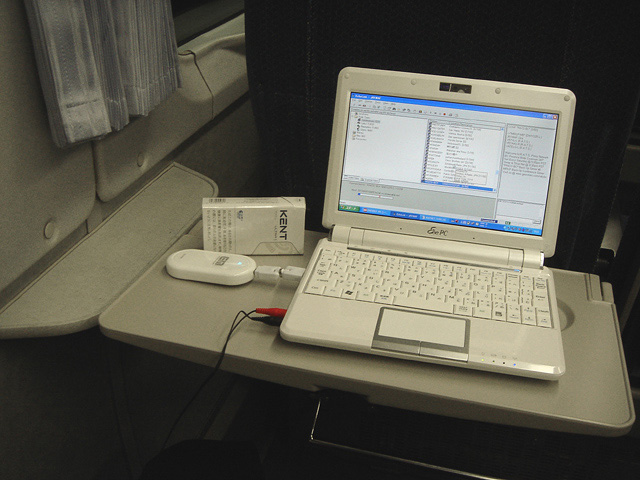
This works perfect for the EchoLink!! The picture shows the scene when I am accesing to the EchoLink in the Super Express train of the Seibu-Ikebukuro Line on my way back home from the office. I am taking a listen to *AUSSIE* (Australian conference). Despite the very fast run of the train, during 45minutes to my home station, the connection never be broken.

With only this set, I can enjoy ragchew with any staion in the world wherever I am in Japan. By accessing my own node, I even can enjoy local ragchew as if I were in my shack! Gee whiz, Fantastic!!
I am enjoying QSOs with U.S., U.K., Aussie, or Spanish stations at lunch time everyday. This set is always with me in a business bag, so when I am out in the car, I enjoy the QSO parking my car at a place with fine scenery.

For you reference, this small P/C has a clock 1.6GHz, RAM1GB, Memory Drive16GB, 8inch display, Litium-ion battery for 8hours use! The O/S is WindowsXP. I only paid 23,000Yen (US$230.00) for this P/C with a contact of E-mobile connection service! Regular laptop P/C is big and heavy! In the beginning people bring it with him all the time, but late on, get hesitate to do so anymore. This P/C is something between Laptop and PDA, and is absolutely the definitive mobile gear.(Nobody would work image processing, office softwares seriously in mobile, would't it?)


** Current System (as of May 31, 2014)

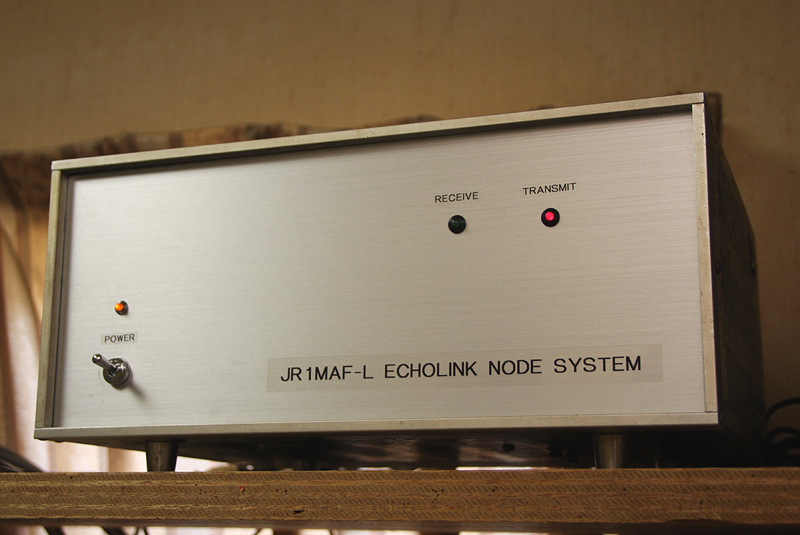
This is the current system of the JR1MAF-L Node System.
Using a junk cabinet of YAESU historical SSB Transmiteer, FLDX400, I built this system with just replacing an alminum panel, paying no money actually, within three hours work!
I installed a red LED for a transmitting indicator, and a green LED for a receiving indicator. together with an orange neon lamp and switch for the AC power, although the power is always kept ON.
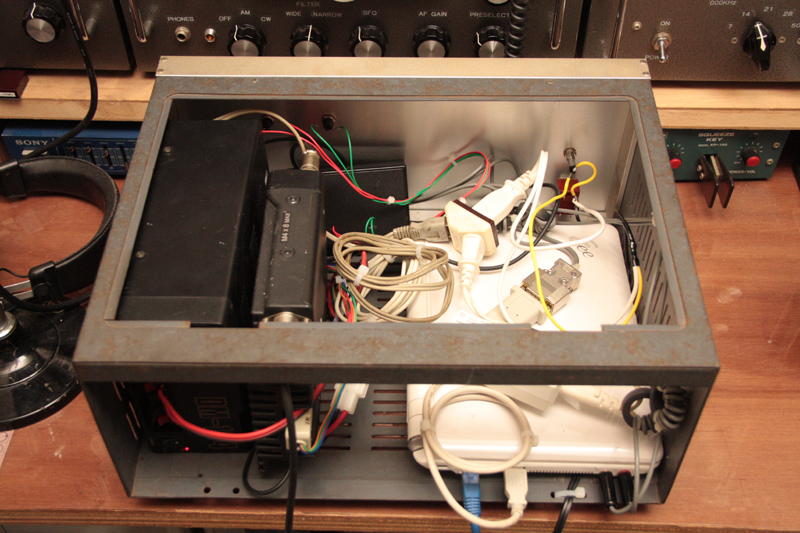
You may see an incredible rough work inside, hi hi.

The Power supply and the transcever (ALINCO 430MHz FM 10W) are fixed to the cabinet with a few bolts directly!
The PC is not firmly fixed to the cabinet for the maintenace, however, it is well stayed and does not move around due to many wires being connected, hi hi.
I placed this system on the top row of the shelf in the shack, and looks very good.

This system has been working for many years by now, even during my stay in Fiji for two years without any maintenace and trouble.
It was really helpful that I was abled to chat with my local stations in Japan every night.
About 30 years ago, when I was staying in Spain for one and a half year, there existed no internet in the world yet, and the international telephone call was extremely expensive.
So my experience in Fiji with echolink system running in my shack back in Japan, was kind of dream!
The Echolink is really wonderfull!

By the way, I am running a small software which reboot the PC everyday at 3 o'clock in the morning to clear the memory. That might be a part of reason why the system has been working properly without any maintenace.


In case you hit this page directly from a Search Engine, you can reach to all of the pages of MAFNET from Top Page

EchoLink, a revolution for DX-ragchewers